Page 1 of 1
Empire Earth resolution problem
Posted: Sat Apr 26, 2014 11:56 am
by TWking
Hello,
I have a problem Empire Earth after installing it on my windows 7 64bit PC.
Whenever I open it it doesn't want to use the whole screen, only about 1/2 of the screen (well a bit less than that)
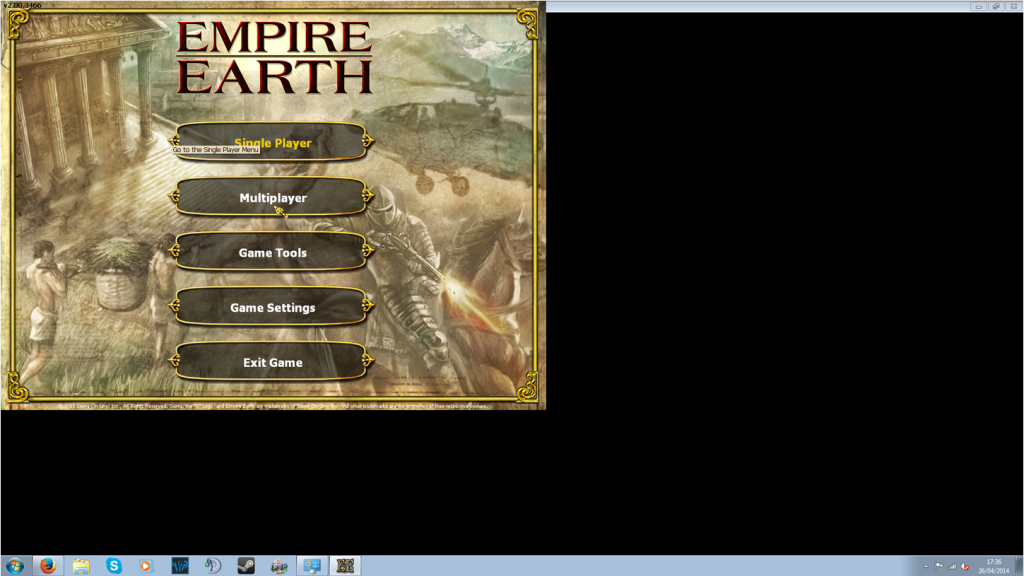
GPU and CPU
-Geforce GTX 660
-AMD Phenom x4 965
Tried fixes
- Compatibility mode (XP, 98, 2000)
- Reinstall
- Run in 256 colours and all other options
- Changing resolution settings in game
- Turning AA off in Nvidia control panel
- changing setting to "let 3d app decide" on Nvidia control panel.
Re: Empire Earth resolution problem
Posted: Sat Apr 26, 2014 12:31 pm
by Arntzen
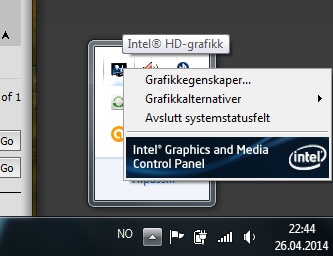
I'm guessing this has something to do with one of your settings in Intel Graphics and Media Control Panel. Look for something like "screen adaptation". This is what worked for me when my EE was centered in the middle of my screen with black bars on the sides.
Re: Empire Earth resolution problem
Posted: Sat Apr 26, 2014 3:42 pm
by TWking
umm how do I find them?
Re: Empire Earth resolution problem
Posted: Sat Apr 26, 2014 3:46 pm
by Arntzen
I found it here on my computer:
- lookhere.jpg (26.55 KiB) Viewed 12507 times
Also you can find it in control panel.
Re: Empire Earth resolution problem
Posted: Sat Apr 26, 2014 6:09 pm
by TWking
A slight problem. I dont have a Intel GPU, I have a Nvidia GPU instead.
I dont have any Intel parts
Re: Empire Earth resolution problem
Posted: Sat Apr 26, 2014 6:42 pm
by Arntzen
Did you look in Nvidia control panel then?
Re: Empire Earth resolution problem
Posted: Sun Apr 27, 2014 4:35 am
by TWking
Yes but I could not find anything to do with "screen adaptation".
Also it seems that it is only confined to the main menu screens, actual games are in full screen so I may have to live with it.
Re: Empire Earth resolution problem
Posted: Sun Apr 27, 2014 5:30 am
by Black Star
Not the first one i heard about having problems, with 64 bit windows, I think aslong as games are not effected should be happy.
Re: Empire Earth resolution problem
Posted: Sun May 04, 2014 10:17 pm
by Ghost
The main menu and the multiplayer lobby use a fixed 1024x768 resolution so the setting to look for in your Nvidia panel may have to do with "scaling"