Empire Earth resolution problem

If you're having any technical difficulties with EE, or installing or using the lobby, make a post here and someone will try and help you out.
Locked
TWking
Forum Noob
Posts: 4
Joined: Sat Apr 26, 2014 11:35 am

Empire Earth resolution problem

Post by TWking »

Hello,

I have a problem Empire Earth after installing it on my windows 7 64bit PC.
Whenever I open it it doesn't want to use the whole screen, only about 1/2 of the screen (well a bit less than that)
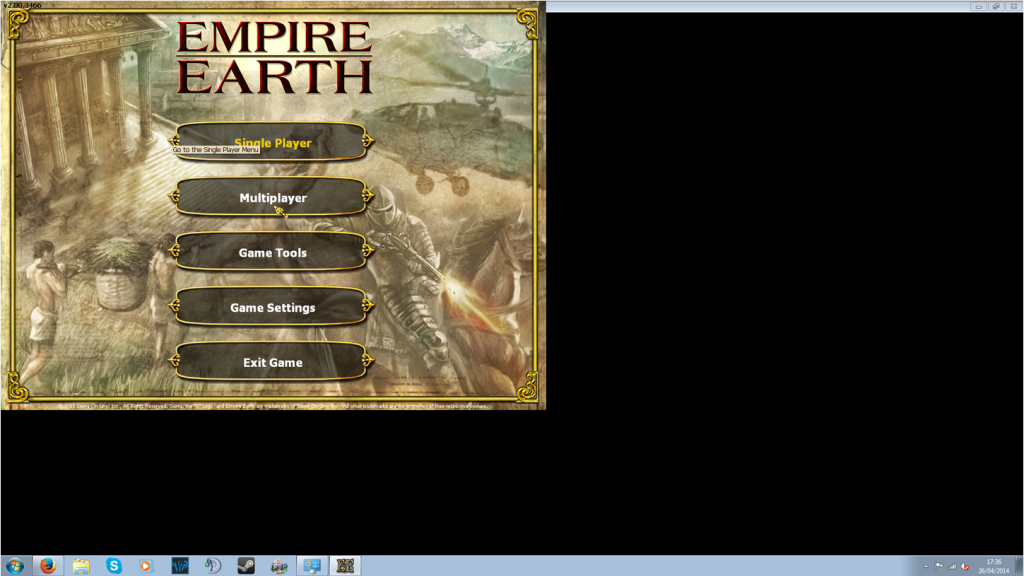
Image

GPU and CPU
-Geforce GTX 660
-AMD Phenom x4 965

Tried fixes
- Compatibility mode (XP, 98, 2000)
- Reinstall
- Run in 256 colours and all other options
- Changing resolution settings in game
- Turning AA off in Nvidia control panel
- changing setting to "let 3d app decide" on Nvidia control panel.
User avatar
Arntzen
Administrator
Posts: 1983
Joined: Sun Jan 17, 2010 4:13 am
Lobby Username: _[eC]_Arntzen_
Location: Norway

Re: Empire Earth resolution problem

Post by Arntzen »

I'm guessing this has something to do with one of your settings in Intel Graphics and Media Control Panel. Look for something like "screen adaptation". This is what worked for me when my EE was centered in the middle of my screen with black bars on the sides.
A Good Place to Start: viewtopic.php?f=75&t=3884
Click to download: eC Civilization

TWking
Forum Noob
Posts: 4
Joined: Sat Apr 26, 2014 11:35 am

Re: Empire Earth resolution problem

Post by TWking »

umm how do I find them?

User avatar
Arntzen
Administrator
Posts: 1983
Joined: Sun Jan 17, 2010 4:13 am
Lobby Username: _[eC]_Arntzen_
Location: Norway

Re: Empire Earth resolution problem

Post by Arntzen »

I found it here on my computer:
lookhere.jpg
lookhere.jpg (26.55 KiB) Viewed 12067 times
Also you can find it in control panel.
A Good Place to Start: viewtopic.php?f=75&t=3884
Click to download: eC Civilization

TWking
Forum Noob
Posts: 4
Joined: Sat Apr 26, 2014 11:35 am

Re: Empire Earth resolution problem

Post by TWking »

A slight problem. I dont have a Intel GPU, I have a Nvidia GPU instead.
I dont have any Intel parts

User avatar
Arntzen
Administrator
Posts: 1983
Joined: Sun Jan 17, 2010 4:13 am
Lobby Username: _[eC]_Arntzen_
Location: Norway

Re: Empire Earth resolution problem

Post by Arntzen »

Did you look in Nvidia control panel then?
A Good Place to Start: viewtopic.php?f=75&t=3884
Click to download: eC Civilization

TWking
Forum Noob
Posts: 4
Joined: Sat Apr 26, 2014 11:35 am

Re: Empire Earth resolution problem

Post by TWking »

Yes but I could not find anything to do with "screen adaptation".
Also it seems that it is only confined to the main menu screens, actual games are in full screen so I may have to live with it.

Black Star
Senior Member
Posts: 201
Joined: Tue Feb 16, 2010 11:41 am
Lobby Username: Die Gurke

Re: Empire Earth resolution problem

Post by Black Star »

Not the first one i heard about having problems, with 64 bit windows, I think aslong as games are not effected should be happy.
[22:23:06] [-Ts-] Tricky: i dont even know what my name is anymore

User avatar
Ghost
Administrator
Posts: 1894
Joined: Fri Nov 07, 2008 12:25 am
Lobby Username: [-Ts-] Ghost
Location: San Francisco, CA, USA

Re: Empire Earth resolution problem

Post by Ghost »

The main menu and the multiplayer lobby use a fixed 1024x768 resolution so the setting to look for in your Nvidia panel may have to do with "scaling"
"Nothing is foolproof to a sufficiently talented fool."
-•¤Lazy Bone¤•-: we had to double ghost or we had no chance
•§ITHLORD§•(surfer): artylery give no many domage on aa mobile since 3 day

Locked

Return to “Support”

Who is online

Users browsing this forum: No registered users and 13 guests